Email newsletter best practices are changing because inboxes are busier, privacy rules are tighter, and subscribers are quicker to ignore anything that feels generic. The good news is simple: a useful newsletter still works. Litmus reports that email often returns about $36 for every $1 spent, and Sinch Mailgun's 2026 Email Impact Report studied more than 400 billion recent sends. That report also points to a problem small teams feel every week: many organizations still struggle to connect email work to measurable business results. If you send with a clear purpose, segment your list, write like a person, and measure what happens after the click, your newsletter becomes a steady revenue channel instead of a weekly chore.
This guide focuses on the practical side. No theory for theory's sake. You will see how to plan a newsletter people want, how to write it, how to design it for mobile, and how to measure results without drowning in dashboards.
Email Newsletter Best Practices Start With A Clear Job
Every newsletter needs a job. That job might be to educate subscribers, move leads closer to a purchase, announce a product update, bring people back to a blog post, or keep a local audience connected between campaigns. The mistake is trying to make one email do all of those things at once.
Before you write, finish this sentence: "This email should help the reader do, understand, or decide ___." If you cannot fill in the blank, the email is not ready. A newsletter with one job is easier to write, easier to scan, and easier to measure.
For small businesses, the strongest newsletter jobs usually fall into a few buckets:
- Teach: share a useful tip, checklist, or mistake to avoid.
- Curate: collect useful links, examples, resources, or updates.
- Sell softly: connect a problem to a product, service, or consultation.
- Retain: remind customers how to get more value from what they already bought.
- Reactivate: bring quiet subscribers back with a timely offer or useful reminder.
The job also shapes the call to action. A teaching newsletter might send readers to a related guide. A selling newsletter might ask them to book a call. A retention newsletter might ask them to try one feature this week. One email, one main action.
If your list is still young, keep your promise narrow. A weekly "marketing tips" newsletter is too broad. A weekly "one practical way to improve your social media or email results" is clearer. Readers should know what they get before they open.
Build The Newsletter Around Segments, Not One Giant List
The fastest way to improve a newsletter is to stop treating every subscriber the same. Someone who downloaded a beginner checklist does not need the same message as someone who requested a quote. A customer who bought last month does not need the same intro sequence as a cold lead.
Segmentation does not have to be complicated. Start with what you already know:
- Source: where the subscriber came from, such as a lead magnet, checkout page, event, or blog post.
- Stage: new lead, warm lead, customer, past customer, partner, or inactive subscriber.
- Interest: the topic they clicked, downloaded, bought, or asked about.
- Engagement: recent openers, recent clickers, quiet subscribers, or people who have not engaged in months.
A simple segmentation system lets you send fewer emails that feel more relevant. That usually beats blasting everyone more often. It also helps protect deliverability because engaged subscribers send better signals to inbox providers.
For example, a business that sells services could tag subscribers by interest: social media, email marketing, SEO, analytics, and content strategy. When a new post goes live, the full list does not need every update. Send the email to the segment most likely to care, then include a broader monthly roundup for everyone else.
If you want a deeper system for sorting subscribers, use an email segmentation strategy before building more campaigns. Segments make every later email easier.
★★★★★5-star client feedback
Turn your email Newsletter Best Practices for Small Business in 2026 into a growth plan.
Tell us what you are trying to achieve with content. We will turn the ideas in this guide into a practical next-step plan.
Email Newsletter Best Practices For Subject Lines And Opens
Subject lines still matter, but they cannot carry a weak newsletter forever. The best subject lines are specific, honest, and tied to the reason someone joined the list in the first place.
A good subject line usually does one of four things:
- Makes a specific promise: "5 ways to fix weak email clicks"
- Names a familiar problem: "Your newsletter may be too busy"
- Creates useful curiosity: "The metric most teams miss after the open"
- Signals timing: "June content ideas for service businesses"
A weak subject line tries too hard. It overuses urgency, mystery, or fake personalization. "You need to see this" might get a few opens, but it teaches readers not to trust you. That is a bad trade.
Preheader text matters too. It should continue the subject line instead of repeating it. If the subject line says, "Your newsletter may be too busy," the preheader might say, "Here is how to remove the sections readers skip." Together, they create a clearer reason to open.
Personalization should be useful, not gimmicky. A first name merge tag is fine when it feels natural, but behavior-based personalization is better. A subscriber who clicked three email marketing links should receive more email marketing guidance. A subscriber who keeps clicking analytics content should get more reporting help. That is personalization people can feel.
Design For Mobile Readers First
Most subscribers will scan your newsletter quickly, often on a phone, often between other tasks. Design for that reality. A newsletter should be easy to skim before it asks for attention.
Use a narrow layout, short paragraphs, clear section labels, and one primary button. Avoid tiny text, crowded columns, and image-only messages. If the email only makes sense when images load, it is fragile. Some subscribers block images. Some inboxes clip large messages. Some readers are checking from a small screen with low patience.
Practical design rules:
- Keep the main body width around 600 pixels.
- Use at least 16px body text.
- Make buttons large enough to tap on mobile.
- Use descriptive link text instead of "click here."
- Add alt text to meaningful images.
- Put the main point near the top.
Design also affects accessibility. Good contrast, readable type, logical headings, and plain link labels help more people read the email. They also make the email feel more polished. The goal is not to make every newsletter look expensive. The goal is to make it easy to read and easy to act on.
Make The Content Useful Enough To Earn The Next Open
Every send trains your audience. If the newsletter is useful, they are more likely to open next time. If it is mostly filler, they learn to skip it. This is why newsletter content needs a repeatable structure.
A strong small business newsletter often uses a simple pattern:
- One useful idea: a tip, mistake, framework, example, or story.
- One proof point: data, customer behavior, a screenshot, a lesson from your work, or a real example.
- One next step: read, reply, book, buy, save, share, or try.
You do not need a long essay every week. Sometimes the best newsletter is a tight 350-word note with one strong idea and a clear next step. Other times, a longer educational issue makes sense. Let the topic decide.
What matters is that the email gives before it asks. Teach something. Clarify something. Save the reader time. Show them a better way to think about a problem. Then make the next step natural.
If you need help deciding what to send, pair newsletter planning with email marketing best practices so your content, automation, and reporting work together.
Here is a concrete example. A home services company could send one monthly newsletter to its full list with seasonal maintenance advice. Then it could send a shorter follow-up only to subscribers who clicked the maintenance link, offering a checklist or appointment reminder. The first email earns attention. The second email responds to behavior. That is the difference between a newsletter blast and a newsletter system.
Choose A Cadence You Can Actually Maintain
Consistency beats ambition. A weekly newsletter is useful only if you can keep sending something worth reading. If weekly sends turn into rushed filler, switch to every other week or a monthly editorial format.
The right cadence depends on your offer, audience, and content engine. A media company might email daily. A service business might send weekly. A local business might send twice per month with useful tips, event updates, and seasonal offers. A consultant might send one high-quality essay per week.
Watch behavior instead of guessing. If open rates stay healthy but clicks fall, the content may not be connected to reader intent. If unsubscribes spike after increasing frequency, slow down or segment harder. If revenue comes from a smaller engaged segment, send more targeted emails to that group instead of pushing the whole list.
Measure More Than Opens
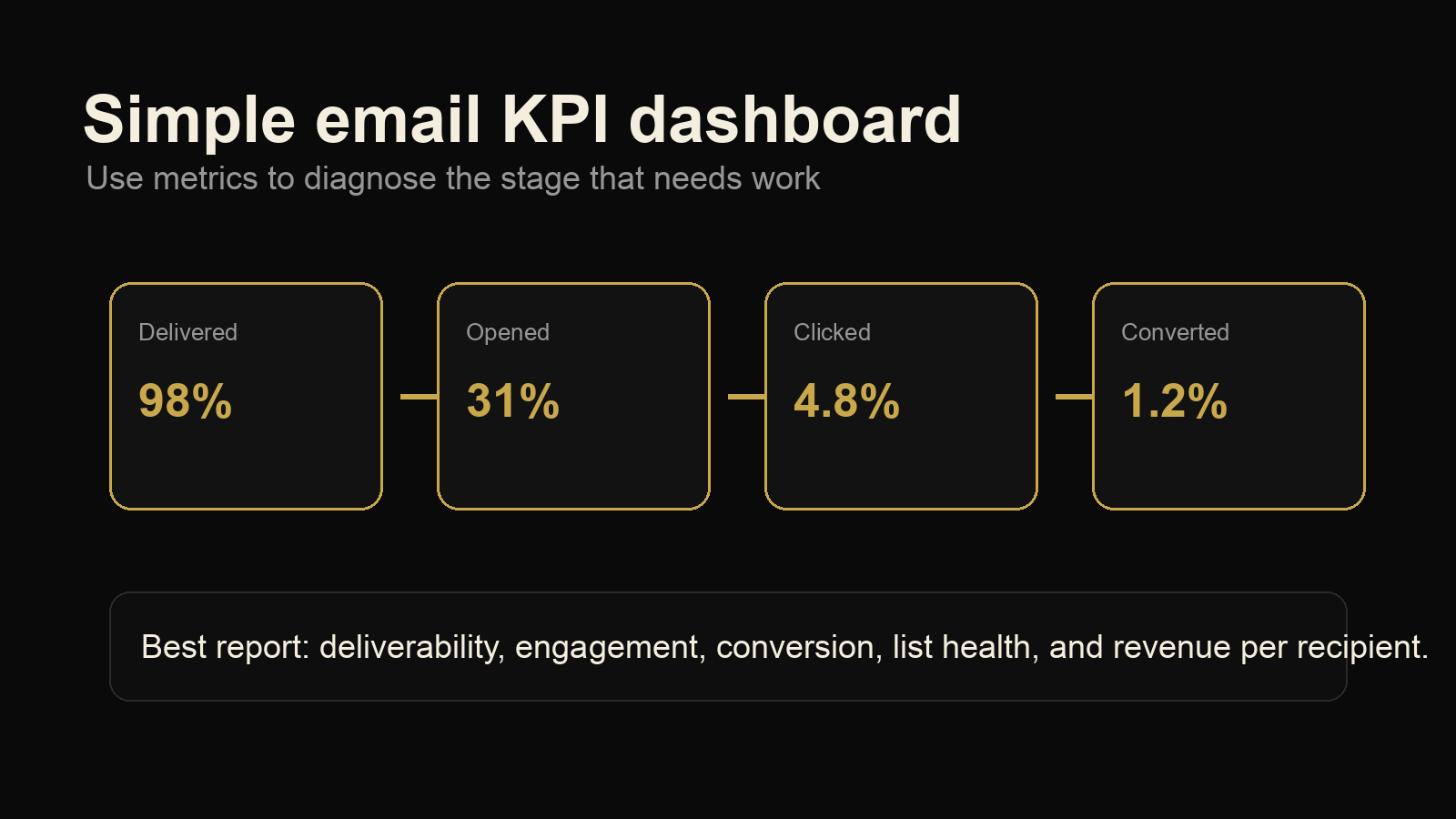
Open rates are useful, but they are no longer enough. Privacy changes can inflate or blur opens, and a high open rate does not automatically mean the email helped the business. Track what happens after the open.
For most small businesses, the core newsletter metrics are:
- Click rate: are people taking the next step?
- Conversion rate: do clicks lead to leads, purchases, bookings, or replies?
- Unsubscribe rate: are you sending the wrong message or sending too often?
- Spam complaint rate: are people marking the email as unwanted?
- Revenue or pipeline influenced: did the email support actual business outcomes?
Litmus and Mailgun both point to the same basic problem: email can produce strong returns, but many teams do not connect newsletter activity to revenue clearly enough. In 2026, that measurement gap matters more because AI-assisted inbox filtering, stricter sender requirements, and privacy limits make weak signals harder to interpret. You do not need a perfect attribution model on day one. You do need clean links, campaign tags, and a simple record of which emails generate leads or sales.
Use UTM parameters on newsletter links. Create a simple dashboard that shows sends, clicks, conversions, unsubscribes, and revenue where possible. Review it monthly, not obsessively after every send. Look for patterns. Which topics drive replies? Which CTAs produce bookings? Which segments click but never buy? That is where the improvement lives.
Protect Deliverability Before You Need To Fix It
Deliverability problems are easier to prevent than repair. If inbox providers start seeing your emails as unwanted, even great content can struggle to reach subscribers.
Start with the basics. Use authenticated sending with SPF, DKIM, and DMARC. Send from a consistent domain. Clean hard bounces. Remove or suppress subscribers who have not engaged in a long time. Make unsubscribing simple. Sending to people who do not want the email is not growth. It is list decay wearing a costume.
Engagement matters. A smaller list of people who read and click is usually more valuable than a bloated list filled with dead addresses. If a subscriber has not opened or clicked in six months, send a re-engagement email. If they still do nothing, let them go. Your future campaigns will be healthier for it.
Also be careful with sudden volume jumps. If you normally send to 2,000 people and suddenly blast 50,000 cold contacts, you are asking for trouble. Build volume gradually and keep list quality high.
A Simple Newsletter Workflow For Small Businesses
Here is a workflow you can repeat without turning newsletter creation into a full-time job:
- Pick one goal: traffic, replies, bookings, sales, retention, or education.
- Choose one segment: the full list only when the topic truly fits everyone.
- Write the subject line and preheader first: they force clarity.
- Draft the email around one useful idea: cut anything that distracts from it.
- Add one CTA: make the next step obvious.
- Test on mobile: check links, spacing, images, and button size.
- Send, then review later: wait long enough for meaningful clicks and conversions.
This workflow is simple by design. Most newsletter problems come from trying to add too much: too many topics, too many links, too many segments, too many goals. Better newsletters are usually cleaner newsletters.
Email Newsletter Best Practices Checklist
Use this checklist before your next send:
- The newsletter has one clear job.
- The focus keyword, offer, or topic matches the audience segment.
- The subject line is specific and honest.
- The preheader adds context instead of repeating the subject line.
- The first screen explains why the reader should keep reading.
- The body is easy to scan on mobile.
- There is one primary CTA.
- Links use UTM tracking.
- The email has been tested before sending.
- The results will be reviewed against clicks, conversions, and list health.
The best newsletters feel consistent without feeling stale. Readers know what they are getting, but each issue still has a useful point. That balance is what keeps people subscribed.
Final Takeaway
Email newsletter best practices are not about chasing every new tactic. They are about sending useful emails to the right people, with a clear reason to read and a clear next step. Start with the job of the email. Segment the list. Write plainly. Design for phones. Measure the actions that matter.
Do that consistently and your newsletter becomes more than a broadcast. It becomes a dependable owned channel that helps people remember, trust, and buy from you.
★★★★★5-star client feedback
Ready to put your email Newsletter Best Practices for Small Business in 2026 into action?
Bring us your goals, current setup, and biggest constraint. We will map the clearest way to apply content to your business.